Python Console
The Python Console runs Python right inside the app, against the map you are looking at. Open it from Processing → Python Console. It docks as a resizable panel at the bottom of the window (drag its top edge to resize, and the ✕ button to close it) — it does not block the rest of the app.
Python runs in your browser via Pyodide (CPython compiled
to WebAssembly), so it works in both the web and desktop builds with nothing to
install. The console exposes a single object, geolibre, that drives the
live app — its methods mirror the geolibre Python package, so
what you learn here transfers to notebooks and back.
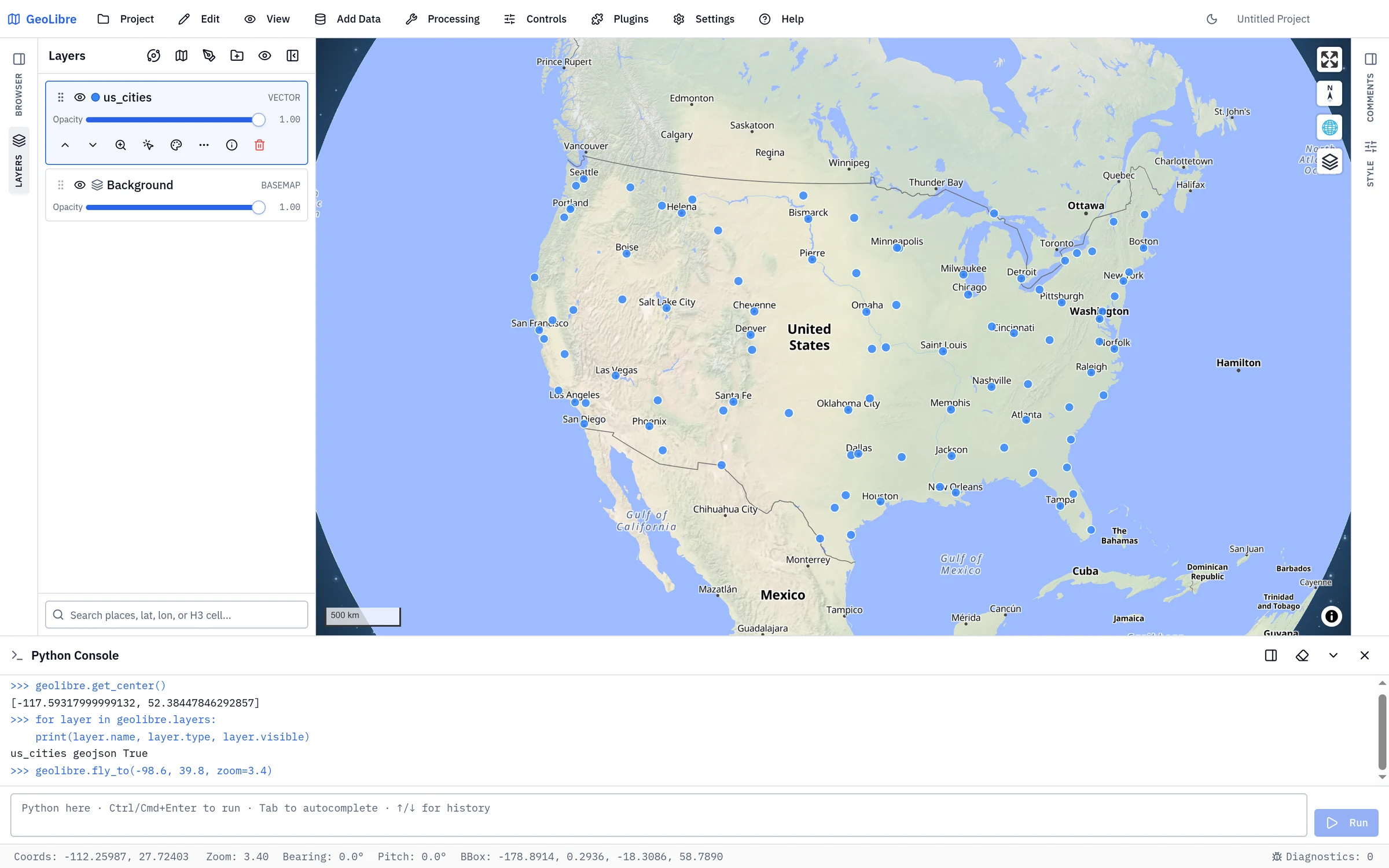
First run
The Python runtime downloads the first time you open the console (a one-time download of a few MB, shown as a progress message in the header). After that it stays warm, and your variables persist as long as the app is open — even if you close and reopen the panel.
Type code in the input box and press Ctrl/Cmd + Enter (or click Run) to execute it. Output, return values, and errors appear in the scrollback above.
Editing shortcuts
| Key | Action |
|---|---|
| Ctrl/Cmd + Enter | Run the current code |
| Enter | Newline (multi-line editing) |
| ↑ / ↓ | Recall previous / next command (when the caret is on the first / last line) |
| Tab or Ctrl + Space | Autocomplete the name or attribute at the caret |
Autocomplete introspects the live runtime, so geolibre. lists its real
methods, and your own variables and any imported modules complete too. When more
than one candidate matches, a list appears — use ↑/↓ to choose and
Enter/Tab to accept, or Esc to dismiss.
geolibre.get_center()        # [lng, lat] of the current view
geolibre.get_bounds()        # [west, south, east, north]
geolibre.fly_to(-122.4, 37.8, zoom=10)
Script editor
For multi-line scripts you want to keep, click Show editor (the panel icon in the header) to open a script editor beside the console — like QGIS's Python editor. Drag the divider to resize it, and click the icon again to hide it.
The editor shares the console's interpreter, so a variable or function you define in a script is immediately usable in the console, and vice-versa.
- New / Open / Save / Save As work with
.pyfiles. On the desktop app, Save writes back to the open file; in the browser it downloads (or uses the File System Access API). An unsaved file shows a•next to its name. - Run (or Ctrl/Cmd+Enter) executes the whole script — or just the selected lines if you have a selection. Output and errors appear in the console on the right.
- Tab indents, Ctrl+Space autocompletes, and Ctrl/Cmd+S saves.
Driving the map
# Add data (a GeoJSON dict, a geometry, or anything with __geo_interface__)
layer_id = geolibre.add_geojson(
    {"type": "Point", "coordinates": [-122.4, 37.8]},
    name="Pin",
    fillColor="#facc15",  # style overrides are applied in the same call
)

# Style, toggle, and inspect layers
layer = geolibre.get_layer(layer_id)
layer.opacity = 0.6
layer.visible = False
layer.set_style(circleRadius=8, fillColor="#ff0000")

for layer in geolibre.layers:
    print(layer.name, layer.type, layer.visible)

# Identify features at a point (like clicking the map)
hits = geolibre.identify(-122.4, 37.8)
Async operations
The console supports top-level await. A few operations are asynchronous and
must be awaited:
# Fetch a remote GeoJSON URL and add it
await geolibre.load_geojson("https://example.com/data.geojson", name="Data")

# Run a processing algorithm; result layers are added to the map
geolibre.list_algorithms()            # discover ids + parameters
result = await geolibre.run_algorithm("buffer", {"layer": layer_id, "distance": 1000})
print(result["logs"], result["resultLayerIds"])
Loading more packages
To keep startup fast, only the base runtime loads up front. Pull in additional packages on demand:
await geolibre.load_package("numpy")
import numpy as np
np.array([1, 2, 3]).mean()

await geolibre.load_package("geopandas")   # also pulls shapely/pyproj/pandas
Any package in the Pyodide distribution is available this way.
geolibre API reference
| Method | Description |
|---|---|
get_view() |
Live camera {center, zoom, bearing, pitch, bbox}. |
get_center() |
Live map center [lng, lat]. |
get_bounds() |
Live viewport bounds [west, south, east, north]. |
fly_to(lng, lat, zoom=, bearing=, pitch=, duration=) |
Animate the camera; only the given fields change. |
fit_bounds([w, s, e, n]) |
Fit the camera to a bounding box. |
set_basemap(url) |
Set the basemap style (an http(s) or root-relative URL). |
identify(lng, lat, layer_id=None) |
Query rendered features at a point (like a click). |
add_geojson(data, name=, **style) |
Add a layer from a GeoJSON dict / geometry / __geo_interface__, with optional inline style overrides; returns the layer id. |
await load_geojson(url, name=, **style) |
Fetch a GeoJSON URL and add it, with the same optional inline style overrides; returns the layer id. |
layers |
List of Layer objects, in draw order. |
get_layer(layer_id) |
The Layer with that id (raises if absent). |
remove_layer(layer_id) |
Remove a layer by id. |
list_algorithms() |
Available processing algorithms (id, name, group, parameters). |
await run_algorithm(id, parameters=None) |
Run an algorithm; adds result layers and returns {logs, resultLayerIds}. |
to_image() |
Capture the current map as PNG bytes. |
await load_package(name) |
Load a Pyodide package on demand. |
Layer
A handle returned by geolibre.layers / geolibre.get_layer(...).
| Member | Description |
|---|---|
id, name, type |
Identity (read-only). |
visible |
Get/set visibility. |
opacity |
Get/set opacity (0–1). |
set_style(**style) |
Merge style overrides (e.g. fillColor="#ff0000"). |
get_features() |
The layer's features as Feature objects. |
zoom_to() |
Fit the camera to the layer's extent. |
remove() |
Remove the layer from the map. |
Feature
A GeoJSON feature returned by Layer.get_features(). It is a plain dict
(so it serializes and feeds into geopandas.GeoDataFrame.from_features), with
convenience accessors .geometry, .properties, .id, and __geo_interface__.
Notes & limitations
- Runs on the main thread, by design, so Python can drive the live map
synchronously. A long-running cell briefly pauses the UI — avoid tight loops
and prefer
await geolibre.run_algorithm(...)for heavy work. - Sandboxed. Pyodide cannot read your computer's filesystem or reach the
desktop app's local tools; network access follows the app's content-security
policy.
to_image()therefore returns bytes rather than writing a file. - Same API as notebooks. The
geolibrePython package exposes the same methods from a JupyterMapobject, so console snippets and notebook code are interchangeable.