AI Assistant
The AI Assistant is a "chat with your data" panel that turns plain-English requests into GeoLibre's own operations — Spatial SQL, layer styling, map control, and more — and applies them through the app, the same way you would by hand. Open it from Processing → AI Assistant (top of the menu) or the command palette. It docks as a resizable panel at the bottom of the window (drag its top edge to resize, ✕ to close).
Because the assistant acts through the store rather than poking the map directly, almost everything it does is undoable with Ctrl/Cmd + Z, and every tool call (including the SQL it generates) is shown in the transcript so you can see exactly what ran.
The assistant is optional and disabled until you configure a provider or the deployment operator enables the managed AI proxy. No data leaves your machine until you send a prompt to the configured provider.
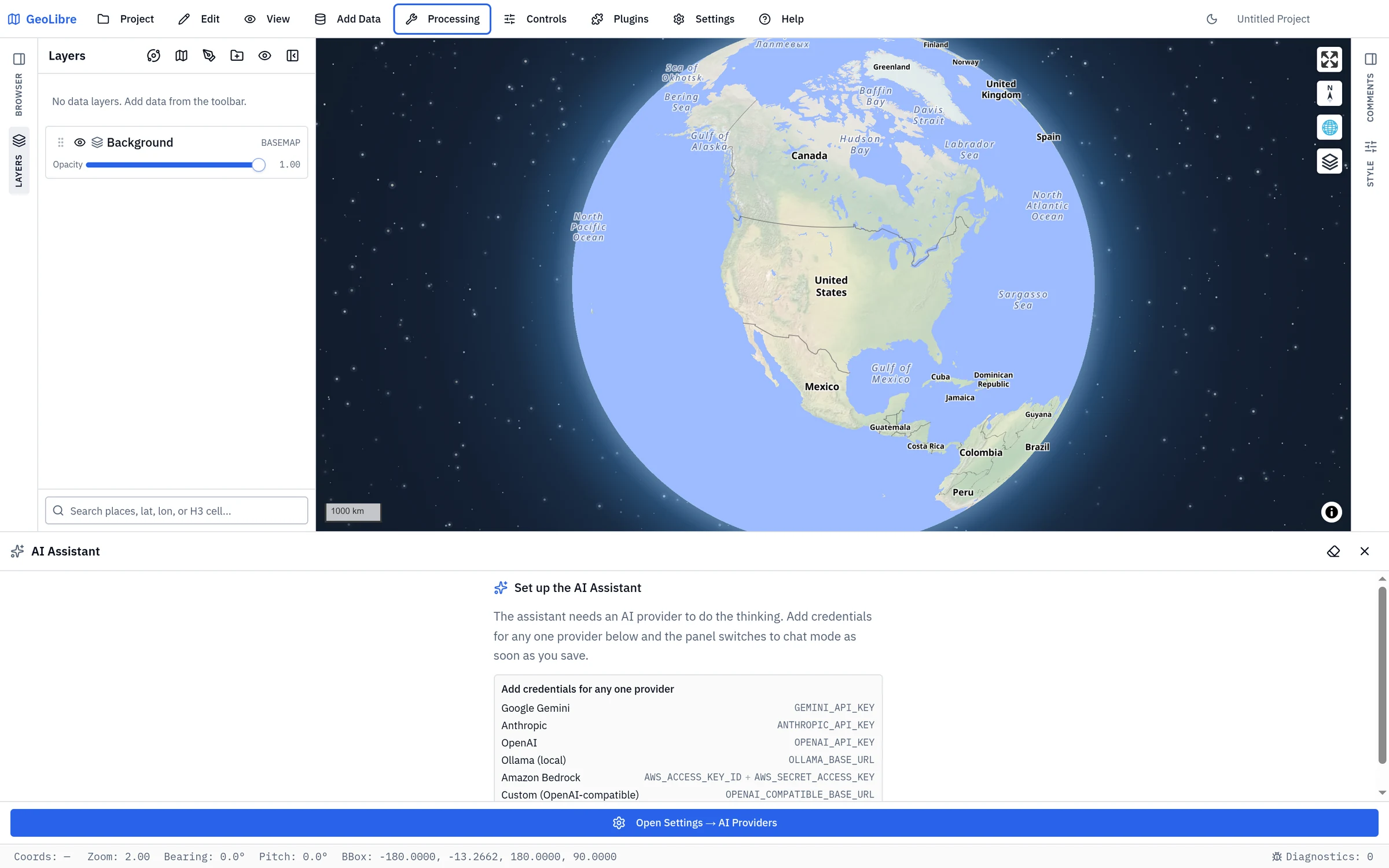
Setup: choose an AI provider
The assistant is provider-pluggable — it uses the Strands Agents SDK. Configure one or more providers in Settings → AI Providers:
| Provider | Environment variable(s) | Default model |
|---|---|---|
| Google Gemini | GEMINI_API_KEY or GOOGLE_API_KEY |
gemini-3.6-flash |
| Anthropic | ANTHROPIC_API_KEY |
claude-opus-5 |
| OpenAI | OPENAI_API_KEY |
Select from the current GPT models |
| Ollama (local) | OLLAMA_BASE_URL (e.g. http://localhost:11434) |
gemma4 |
| Amazon Bedrock | AWS_ACCESS_KEY_ID + AWS_SECRET_ACCESS_KEY (+ AWS_REGION, optional AWS_SESSION_TOKEN) |
global.anthropic.claude-opus-5 |
| Custom (OpenAI-compatible) | OPENAI_COMPATIBLE_BASE_URL (+ optional OPENAI_COMPATIBLE_API_KEY) and OPENAI_COMPATIBLE_MODEL |
— |
- Ollama runs models on your own machine — no API key and nothing leaves your
computer. Point
OLLAMA_BASE_URLat your Ollama host (the/v1suffix is added automatically); setOLLAMA_MODELto pick which pulled model to use. - Bedrock calls AWS from the browser using your credentials (and the model
id is an inference-profile id such as
global.anthropic.claude-sonnet-4-6; setBEDROCK_MODELto choose another). - Custom covers any OpenAI-compatible endpoint — LiteLLM, vLLM, OpenRouter, Groq, Together, a local server, etc. — via its chat-completions API.
Hosted keys (and AWS credentials) are used directly from your browser to call the provider; they are never sent to GeoLibre's servers. Saving the setting enables the panel immediately — no reload needed.
Using local Ollama from web.geolibre.app
The hosted web app connects directly from your browser to Ollama on your
computer. Prompts and responses do not pass through a GeoLibre server. Because
the page origin is https://web.geolibre.app, Ollama must explicitly allow that
origin before the browser can call its API.
Set this environment variable for the Ollama server, then restart Ollama:
OLLAMA_ORIGINS=https://web.geolibre.app
Then open Settings → AI Providers, add or edit an Ollama profile, and use this Base URL:
http://localhost:11434
Configure OLLAMA_ORIGINS for your operating system:
Run sudo systemctl edit ollama.service and add:
[Service]
Environment="OLLAMA_ORIGINS=https://web.geolibre.app"
Save the file, then reload and restart the service:
sudo systemctl daemon-reload
sudo systemctl restart ollama
Set the variable for the Ollama application, then quit and reopen Ollama:
launchctl setenv OLLAMA_ORIGINS "https://web.geolibre.app"
- Quit Ollama from the taskbar.
- Open Edit environment variables for your account.
- Create a user variable named
OLLAMA_ORIGINSwith the valuehttps://web.geolibre.app. - Start Ollama again from the Start menu.
Pass the allowed origin when starting the container:
docker run -d \
  -e OLLAMA_ORIGINS=https://web.geolibre.app \
  -p 11434:11434 \
  ollama/ollama
For a self-hosted GeoLibre URL, replace https://web.geolibre.app with the
exact origin shown in GeoLibre's error message, including its scheme and port,
for example http://192.168.1.98:4000. This is an Ollama server permission and
cannot be enabled automatically by a web page. See Ollama's
official server configuration and web-origin instructions.
Managed AI in a password-protected Docker deployment
A deployment operator can provide AI without distributing provider API keys.
In this configuration, the browser calls the same-origin /ai route. Docker's
nginx checks the instance's HTTP Basic Auth username and password when the
operator has configured it, then adds a server-only instance token and forwards
the request to ai.geolibre.app. The browser receives neither the instance
token nor the Cloudflare AI Gateway token.
Users only need to sign in to the GeoLibre instance; they do not configure an
AI provider key. Requests sent directly to ai.geolibre.app without the
server-only token receive 401 Unauthorized.
The operator must start the container with all managed-AI variables:
docker run --rm -p 8080:80 \
  -e GEOLIBRE_AUTH_USER=admin \
  -e GEOLIBRE_AUTH_PASSWORD='change-me' \
  -e GEOLIBRE_AI_URL=/ai \
  -e GEOLIBRE_AI_MODEL=openai/gpt-5.6-luna \
  -e GEOLIBRE_AI_PROXY_URL=https://ai.geolibre.app \
  -e GEOLIBRE_AI_PROXY_TOKEN="$GEOLIBRE_AI_PROXY_TOKEN" \
  ghcr.io/opengeos/geolibre:latest
If GEOLIBRE_AI_URL is unset, the Docker entrypoint leaves the managed proxy
disabled and does not inject any AI proxy URL into the application.
For news search in the NASA OPERA disaster workflow, add TAVILY_API_KEY as a
secret on the geolibre-ai-proxy Worker. Do not pass that key to the container
with docker run -e: the container never reads it. The browser uses the same
authenticated /ai route, and nginx keeps both the Worker token and Tavily key
out of frontend configuration. The desktop app reads a variable of the same name
for its own web search,
which is a separate client-side mechanism unrelated to this one.
Optional variables:
| Variable | Purpose |
|---|---|
GEOLIBRE_ASSISTANT_PROVIDER |
Force a provider (google / anthropic / openai) when several keys are set. |
GEOLIBRE_ASSISTANT_MODEL |
Pin a specific model id, overriding the default and the picker. |
When more than one provider key is configured, a provider dropdown appears in the panel header; a model dropdown lets you switch models for the selected provider. Your choice is remembered across sessions.
Reading keys from your system environment (desktop)
On the desktop app, GeoLibre also reads the assistant's keys directly from
your operating system's environment variables — the ones you export from your
shell profile or set in the Windows Environment Variables dialog. Set a
supported variable in your OS environment, restart the app, and the matching
provider is configured automatically: you never type the key into Settings, and
because it is not entered there, it is never written to the saved
.geolibre.json project file. This is the recommended way to keep API keys out
of project files that you share or commit.
Only the following allowlisted names are read from your environment — GeoLibre
never reads any other system variable (your PATH, HOME, and the like never
reach the app), and this allowlist is enforced in the native backend, not just
the UI:
| Group | Variables read from the OS environment |
|---|---|
| Provider / model overrides | GEOLIBRE_ASSISTANT_PROVIDER, GEOLIBRE_ASSISTANT_MODEL |
| Google Gemini | GEMINI_API_KEY, GOOGLE_API_KEY, GOOGLE_GENAI_API_KEY |
| Anthropic | ANTHROPIC_API_KEY |
| OpenAI | OPENAI_API_KEY |
| Ollama | OLLAMA_BASE_URL, OLLAMA_MODEL |
| Custom (OpenAI-compatible) | OPENAI_COMPATIBLE_BASE_URL, OPENAI_COMPATIBLE_API_KEY, OPENAI_COMPATIBLE_MODEL |
| Web search | TAVILY_API_KEY |
Precedence: a value you enter in Settings → Environment Variables always wins; the OS environment only fills in the gaps. In the AI settings, any field supplied by the environment shows a note naming the variable backing it — leave that field blank to keep using the environment value.
Amazon Bedrock is not sourced from the OS environment
Bedrock's AWS_ACCESS_KEY_ID / AWS_SECRET_ACCESS_KEY credentials (and the
ambient OLLAMA_HOST) are deliberately excluded from OS-environment
reading: developers commonly have AWS credentials exported in their shell for
unrelated work, and silently adopting them could auto-activate Bedrock and
bill their AWS account for LLM calls they never intended. To use Bedrock,
enter the credentials in Settings → Environment Variables.
Desktop only
Reading OS environment variables requires the native backend, so it applies to the desktop app only. The browser and Jupyter builds cannot read the system environment; there, enter keys in Settings → Environment Variables (or bake them in at build time). Changes to OS variables are picked up on the next app launch.
Using it
Type a request and press Enter (or click Send); Shift + Enter inserts a newline, and Ctrl/Cmd + Enter still sends. The assistant streams its reply, runs tools as needed, and reports what it did. While it is working, Send becomes Stop — click it to cancel. Clear (the eraser icon) starts a fresh conversation.
show me all parcels larger than 1 hectare within 500 m of a river
color the counties by population using a graduated red ramp
buffer the roads by 100 m, then clip them to the county boundary
load the latest Sentinel-2 scene over this view
zoom to Africa, then switch to a dark basemap
add an OpenTopoMap basemap
What it can do
The assistant works by calling a fixed set of tools — it cannot invent operations, so its actions stay within GeoLibre's validated surface.
| Capability | What it does |
|---|---|
| Inspect layers | Lists loaded layers, their geometry, attribute fields, and SQL table names (schema only — never your full data). |
| NL → Spatial SQL | Generates and runs a read-only DuckDB Spatial SQL query through the SQL Workspace, and can add the result as a layer. |
| Geoprocessing | Runs the registered processing algorithms (buffer, clip, dissolve, intersection, difference, union, spatial join, simplify, H3 grids, …) and chains them into multi-step pipelines, adding each result as a layer. |
| Raster tools | Searches the Whitebox catalog and runs its tools in the browser via WASM — hydrology (fill depressions, flow accumulation, extract streams), terrain (slope, aspect, hillshade), LiDAR, image processing, raster↔vector conversion — adding each result as a layer. |
| Model Builder | Creates a validated, editable Model Builder workflow from a description, saves it with the project, and opens it for review before you run it. It draws on the same palette as the canvas — client-side vector tools plus the full Whitebox catalog — so a raster chain such as fill depressions → flow accumulation → extract streams is a valid model. If the canvas holds unsaved work or a run is still in flight, Model Builder asks before replacing it. |
| Symbology | Applies a graduated (numeric) or categorized (text) color ramp to a layer. |
| Add data | Adds a layer from a public GeoJSON URL, or an XYZ tile basemap by name (osm, opentopomap, carto-dark) or a custom {z}/{x}/{y} URL. |
| Earth observation | Searches the Microsoft Planetary Computer STAC catalog (Sentinel-2, Landsat, NAIP, DEMs, …) and adds an item over the current view as a raster layer — tiles are signed server-side, so no credentials are needed. |
| Map control | Moves the camera (fit a layer or a bounding box), switches the basemap, toggles layer visibility/opacity, and removes layers. |
| Web search | Looks up current information online (best with TAVILY_API_KEY). |
| Code fallback | For tasks with no dedicated tool, runs a small JavaScript snippet against the live map (e.g. globe projection) or a Python snippet in the Pyodide runtime. |
Sample prompts
Prompts are free-form — these are starting points, not fixed commands. Refer to layers by name; the assistant looks up the rest. You can also chain steps in one message ("buffer the roads by 100 m and then clip to the county boundary") or keep refining across turns ("now color it by area").
Explore & query
what layers are loaded, and what fields does the parcels layer have?
how many parcels are larger than 1 hectare?
list the 10 most populous counties with their population
show parcels within 500 m of a river and add them as a layer
count points in each polygon of the districts layer
Geoprocessing & analysis
buffer the roads by 100 meters
buffer the roads by 100 m, then clip the buffer to the county boundary
create a Model Builder model that buffers roads by 100 m, clips the result to counties, and names the output Road buffers
dissolve the parcels by zoning type
find where the floodplain overlaps the buildings (intersection)
create an H3 hex grid at resolution 8 over the points and count points per cell
compute centroids of the counties and add them as a layer
Symbology
color the counties by population with a graduated red ramp
style the parcels categorized by land-use type
shade the tracts by median income using a viridis ramp with 7 classes
Add data & imagery
load the latest Sentinel-2 scene over this view
add the most recent cloud-free Landsat image for this area
search the Planetary Computer for NAIP imagery here
add an OpenTopoMap basemap
add this GeoJSON: https://example.com/data.geojson
Map control & styling
zoom to the parcels layer
fly to San Francisco
switch to a dark basemap
hide the buildings layer and set the parcels opacity to 0.5
remove the temporary buffer layer
Advanced (code fallback)
switch the map to a 3D globe projection
enable terrain with hillshade exaggeration of 1.5
load a CSV from a URL with pandas and summarize its columns
Safety and privacy
- Acts through the store. Layer, style, basemap, and add/remove actions go through the same one-way data flow as the rest of the app, so they are reconciled consistently and covered by undo/redo.
- Auditable. The generated SQL and every tool call appear in the transcript.
- Read-only SQL. The
run_sqltool rejects anything that isn't aSELECT/WITHquery. - Scoped context. Only layer/table names, attribute field names, and the current view are sent to the model — not your feature data.
- What leaves your browser. When you send a prompt, it (plus that scoped context) is sent to your chosen LLM provider using your own key. Don't enable the assistant on sensitive data you can't share with that provider.
Code-execution caveat
The JavaScript and Python fallbacks execute model-generated code in the app to cover requests no dedicated tool handles. Their direct map changes bypass the store and are not undoable. The code is shown in the transcript.
Limitations
- Requires a provider API key; offline use is not supported.
- Subject to each provider's cost, rate limits, and your network's CORS/CSP policy (browser-side calls).
- The unofficial Google Maps tile endpoints are intentionally not included; use the listed officially-supported basemaps or supply your own XYZ URL.
Not the same as the agent skill
The assistant runs inside GeoLibre and edits the map you are looking at. To have an AI agent outside GeoLibre — in a terminal, an editor, or a notebook — build a project file for you, see the agent skill and the MCP server.