Data Integrations
Beyond the Add Data menu, GeoLibre connects to several hosted catalogs and imagery providers through dedicated panels and plugins. This page is a map of what is available and where to find it.
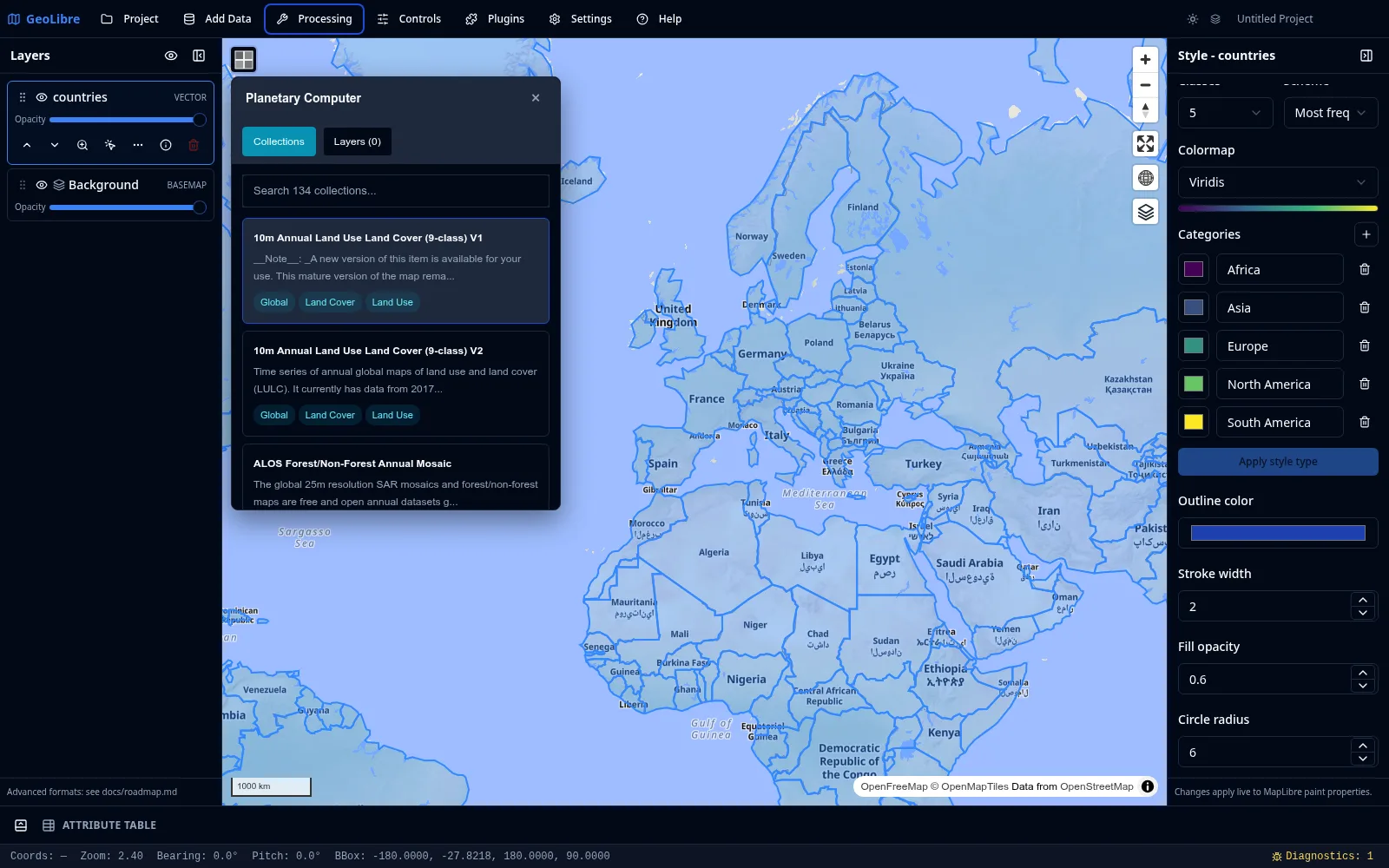
Cloud catalogs
| Integration | Where | What it does |
|---|---|---|
| Planetary Computer | Processing menu | Browse and load STAC data from Microsoft Planetary Computer (Sentinel, Landsat, and more). |
| Earth Engine | Processing menu | Browse and load Google Earth Engine datasets after authenticating. |
| Overture Maps | Plugins menu | Load Overture Maps data themes (such as buildings, places, and transportation). |
| STAC | Add Data menu | Search any STAC catalog and add matching raster items. See Adding Data. |
Credentials
Earth Engine requires authentication, and some providers expect an API key or token. Set these in Settings → Environment Variables. See Settings & Preferences.
Self-hosted catalogs
| Integration | Where | What it does |
|---|---|---|
| GeoLens | Plugins menu | Connect to a self-hosted GeoLens catalog, search its datasets, and add them as signed vector tiles, OGC API Features GeoJSON, or server-rendered raster tiles. |
GeoLens is an open-source spatial catalog (FastAPI + PostGIS) that you run on
your own infrastructure, which makes it the recommended way to keep private data
private while still working with it in GeoLibre. In the plugin panel, enter your
server's base URL (for example https://maps.example.org) and, for private
datasets, a GeoLens API key. Each result links back to its metadata page, vector
tile tokens are refreshed automatically before they expire, and a dataset loaded
as GeoJSON can be edited and written back to GeoLens feature by feature when the
server allows it.
The API key is kept in memory for the session only: it is never written to the project file or to browser storage, so a saved project records just the server URL and dataset id. Layers from public datasets restore automatically; layers from private ones stay blank until the recipient reconnects with their own key.
See Self-Hosting & Private Data for the full deployment guide, including how to serve GeoLibre and GeoLens from one origin behind a single sign-on layer.
Web Services
The Web Services submenu of the Plugins menu bundles more than thirty catalog and service browsers, from the United States federal sources below to general-purpose STAC, ArcGIS Hub, Source Cooperative, and Hugging Face browsers. All of them are documented on the Web Services page.
| Service | Data |
|---|---|
| FEMA NFHL | National Flood Hazard Layer (NFHL) flood data. |
| NASA Earthdata | NASA satellite and Earth science imagery. |
| EPA EnviroAtlas | Environmental and ecosystem data. |
| USGS National Map | The National Map topographic and geographic layers. |
| USGS NLDI | Flowline tracing, hydrolocation, basins, and network navigation. See USGS NLDI workflows. |
Imagery and street-level
| Integration | Where | What it does |
|---|---|---|
| Historical Imagery | Plugins menu | Browse historical Esri World Imagery snapshots. |
| Vantor Open Data | Plugins → Web Services | Search disaster-event satellite imagery, filter pre/post-event scenes by map extent, visualize Cloud-Optimized GeoTIFFs, and download selected scenes. |
| Planet Open Data | Plugins → Web Services | Browse Planet Labs PBC disaster data releases through the STAC Catalogs interface, with the public disaster catalog selected by default. |
| Street View | Plugins menu | View Google Street View or Mapillary street-level imagery at a clicked point. Needs provider credentials (see Getting Started). |
| Mapillary | Plugins menu | Browse Mapillary street-level imagery in its own viewer. Needs a Mapillary access token (see Getting Started). |
Time series and comparison
| Plugin | What it does |
|---|---|
| Time Slider | Animate time series raster and vector data (COG, XYZ/WMTS, WMS-Time, and time-filtered GeoJSON) through a docked timeline. |
| Layer Swipe | Compare two layers side by side with a swipe handle. |
AI analysis
| Plugin | What it does |
|---|---|
| GeoAgent | AI-assisted geospatial analysis. |
The plugins under Imagery and street-level, Time series and comparison, and AI analysis are activated from the Plugins menu (the integrations further up this page are reached from the Processing and Add Data menus instead). Most of them, like the Web Services panels, open docked beside the Layers panel; only Street View and Mapillary place a control on the map, so only they offer a position choice in their Plugins submenu.
Geocoding
GeoLibre can turn addresses into points and points into addresses. Both run through a selectable provider; the public Nominatim service is the default and needs no key.
| Tool | Where | What it does |
|---|---|---|
| Geocode Addresses | Processing → GeoLibre Toolbox | Pick a CSV with an address column and geocode each row into a point layer. Each matched row keeps its original columns plus geocode_lat, geocode_lon, geocode_display_name, and geocode_importance (a match score). A per-run provider picker lets you switch backend for that batch. |
| Delimited Text Layer → Addresses | Add Data | Geocode a CSV/TSV at import time instead of a separate step: choose "Addresses" as the import mode, pick one or more columns to concatenate into the address (e.g. street, city, state), and each row is geocoded through the project's configured provider. Matched rows become points; rows with no match are kept (not dropped) with geocode_status: "unmatched" so they stay visible and fixable in the attribute table. |
| Reverse Geocode | Controls menu | A toggle. While on, click anywhere on the map to look up the address at that point, shown in a popup with a copy button. The popup follows the app's light or dark theme. |
All three send coordinates or addresses to a third-party service, so the first time you enable Reverse Geocode (and whenever you run a batch, including at CSV import time) your data leaves your device for those requests. Reverse Geocode shows a one-time notice before it is first enabled.
Providers
Choose a backend in Settings → Geocoding. The selection, per-provider API keys, optional endpoint overrides, and contact email are saved with the project.
| Provider | API key | Notes |
|---|---|---|
| Nominatim (OpenStreetMap) | No | Default. Public endpoint is paced and row-capped (see below); point it at a self-hosted instance to relax both. |
| CartoCiudad (IGN España) | No | Official Spanish national geocoder (IGN/CNIG). Free public API, no key required. |
| Pelias | Optional | Hosted geocode.earth needs a key; a self-hosted Pelias does not. |
| ArcGIS World Geocoder | Yes | Esri token / API key. |
| ArcGIS GeocodeServer (organization) | No | Your organization's own locators. See Organization locators. |
| Mapbox | Yes | Mapbox access token (pk.…). |
| Yes | Google Maps Geocoding API key. Google does not officially allow browser cross-origin requests to this API, so a same-origin proxy may be required. |
API keys are stored in plain text in the .geolibre.json project file, so avoid sharing a project that carries them (the Project → Share flow can strip environment variables, but provider keys live under Geocoding settings).
Organization locators
Cities, counties and utilities often publish their own ArcGIS GeocodeServer locators: address locators built from local address points, parcel locators that find a parcel or folio number, asset locators that find a hydrant or valve ID. Choose ArcGIS GeocodeServer (organization) in Settings → Geocoding to use them with the same search box, Geocode Addresses, address import and Reverse Geocode as any other provider.
- Add a locator for each service, give it a name, and paste its GeocodeServer URL (
https://gis.example.org/server/rest/services/Locators/Parcels/GeocodeServer). An operation URL (.../GeocodeServer/findAddressCandidates) works too; GeoLibre keeps the base URL and drops any query string, so a token pasted with the URL is never saved. With more than one locator, Active locator picks the one in use. - Check service reads the locator's metadata and shows its search field and whether it supports reverse geocoding and suggestions. Searches go to the locator's single-line field, or to its only input field when it publishes just one (an asset ID locator, for example). The locator decides how a search is matched and ranked.
- A locator without reverse geocoding still searches; Reverse Geocode then says the locator does not support it instead of showing an address.
- Results are requested in WGS 84 (
outSR=4326). Many organization locators work in a projected system such as State Plane; if a service returns coordinates in a system GeoLibre cannot convert (anything other than WGS 84 or Web Mercator), the search reports an error rather than placing the result in the wrong spot. - Errors the service reports, such as an invalid token or missing permission, are shown as errors rather than as "no results".
Secured locators. A public locator needs no key. For a secured locator on ArcGIS Enterprise, enter the Portal URL it is federated with and sign in to that portal (Add Data → ArcGIS Layer with Sign in with ArcGIS, or Plugins → Web Services → ArcGIS Portal). GeoLibre then sends that portal's access token with the locator's requests, renewing it the same way as for ArcGIS layers; signing out stops it. The token is only sent when the locator is on the portal's own host, or on an ArcGIS Server whose rest/info names that portal as its owner (a federated server) and that you have checked with Check service while signed in to the portal, then saved Settings, on this device. That is your approval to send that portal's sign-in to that server; cancelling Settings grants nothing, and a server's own claim to be federated is not enough, so a shared project cannot route your token to a new server on its own. Requests that carry the token always go to the locator's own URL (endpoint overrides do not apply to this provider) and do not follow redirects. A standalone ArcGIS Server, or one federated with another portal, never receives it, and Check service says so.
Locator names, URLs, portal URLs and capabilities are saved with the project. Tokens never are. In the web build the locator's server must allow browser requests from GeoLibre's origin (CORS); most ArcGIS Server sites do. The desktop app also sends organization locator requests through the webview, so the same applies there.
Usage policy and limits
Requests to the public Nominatim endpoint are paced to one per second and a single batch run is capped at 1000 rows, in line with the Nominatim usage policy. Browsers cannot set a User-Agent, so the app identifies itself through the page Referer and the optional email parameter.
The public CartoCiudad endpoint is paced to roughly five requests per second and is not row-capped. IGN publishes no rate limit, so this is a courtesy default rather than their policy: it keeps a large batch from bursting at a free public service without borrowing Nominatim's much stricter numbers.
Self-hosted Nominatim and the keyed providers (Mapbox, ArcGIS, Google, hosted Pelias) are not paced or capped by GeoLibre; their own quotas apply.
Configuring with environment variables
The Geocoding settings panel is the easiest way to configure a provider, but the same values can also be set as runtime environment variables (the same VITE_-prefixed mechanism used for imagery credentials). Explicit environment variables override the Settings panel.
| Variable | Default | Purpose |
|---|---|---|
VITE_GEOCODER_PROVIDER |
nominatim |
Provider id: nominatim, cartociudad, pelias, arcgis, arcgis-locator, mapbox, or google. |
VITE_GEOCODER_API_KEY |
unset | API key / access token for the selected provider. |
VITE_GEOCODER_ENDPOINT |
provider default | Forward (address to point) search endpoint override. |
VITE_GEOCODER_REVERSE_ENDPOINT |
provider default | Reverse (point to address) endpoint override. |
VITE_GEOCODER_EMAIL |
unset | Contact email sent as the email query parameter to identify your client to Nominatim. |
VITE_GEOCODER_LOCATOR |
set from Settings | The selected organization locator as JSON (id, name, url, optional portalUrl and capabilities), for arcgis-locator. |