Cloud-native desktop GIS
MapLibre-powered GIS for local projects and modern geospatial workflows.
GeoLibre is a lightweight desktop GIS prototype built with Tauri, React, TypeScript, MapLibre GL JS, DuckDB-WASM Spatial, and deck.gl. It focuses on fast local data work, project files, styling, plugins, and a practical path toward cloud-native geospatial workflows.
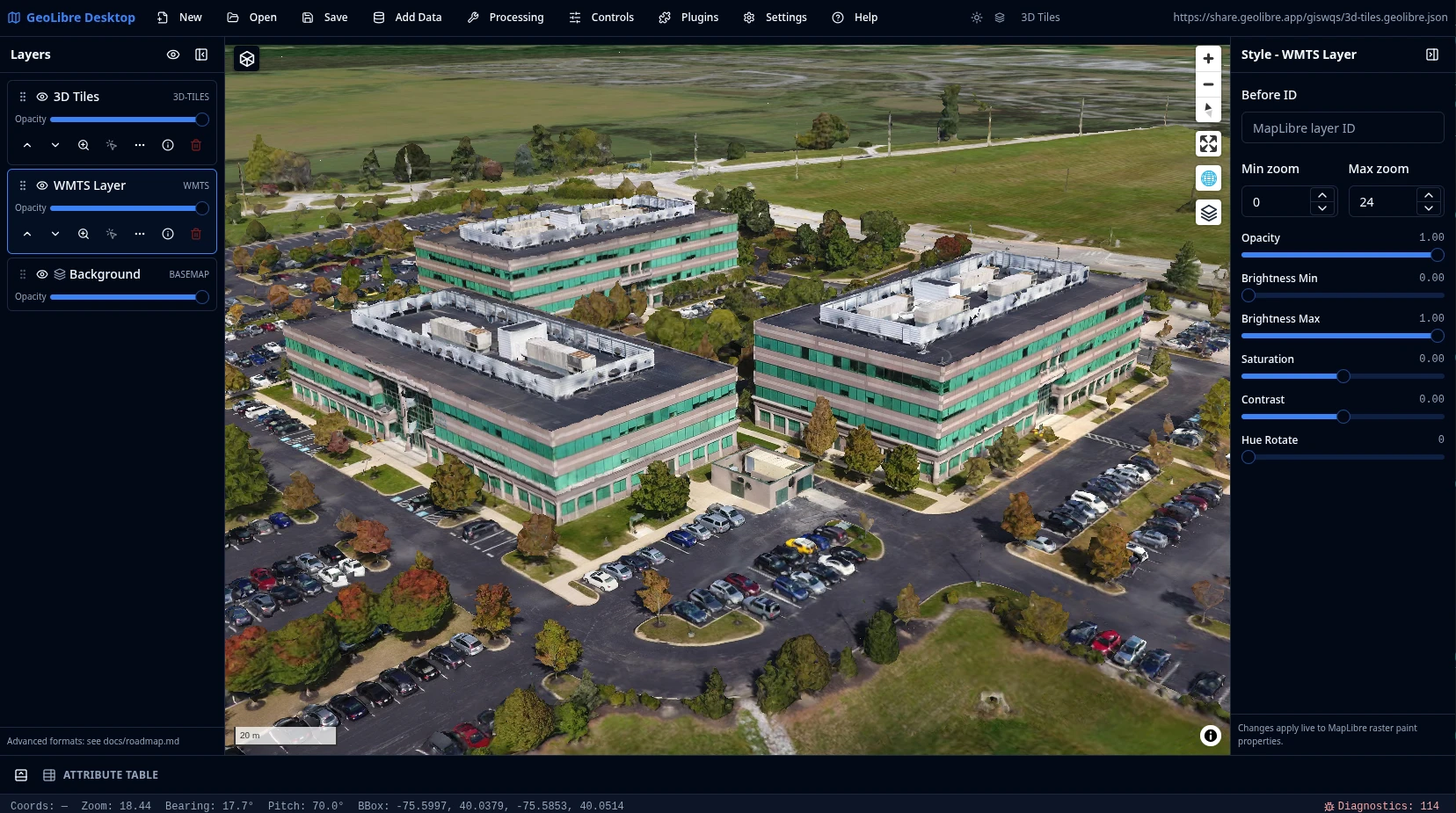
What GeoLibre does today
MapLibre map workspace
Use OpenFreeMap basemaps, a blank background, smooth pan and zoom, and toggle built-in map controls for navigation, terrain, globe view, geolocation, scale, attribution, and logo display.
Local and remote data
Load local vector data supported by DuckDB-WASM Spatial, add web tile and service layers, inspect attributes, style layers, reorder visibility, and save or reopen .geolibre.json projects from the desktop app.
Plugin-ready UI
Built-in plugins cover basemaps, sample data, layer control, MapLibre components, swipe, street view, LiDAR, GeoAgent, and GeoEditor integrations.
Advanced layer formats
Add Data supports XYZ, WMS, GeoJSON URLs, vector tiles, COG and GeoTIFF rasters, MBTiles, ArcGIS layers, FlatGeobuf, PMTiles, Zarr, LiDAR, and Gaussian splats.
Processing foundation
The processing toolbox includes client-side algorithms now, with a roadmap toward DuckDB Spatial and an optional Python sidecar for heavier geoprocessing.
Try it in the browser
The live demo is the browser-capable version of the GeoLibre desktop UI. It is useful for exploring the map, loading browser-selected vector data supported by DuckDB-WASM Spatial, adding URL-based layers, styling layers, and testing plugins. Desktop-only file dialogs, local MBTiles, local raster reads, and filesystem save/open operations still require the installed Tauri app.
Open a project by passing a public .geolibre.json URL with the url query parameter:
https://viewer.geolibre.app/?url=https://share.geolibre.app/giswqs/3d-tiles.geolibre.json
For narrow embeds, add ?layout=compact to the demo URL to use icon-only toolbar buttons and hide project metadata:
https://viewer.geolibre.app/?url=https://share.geolibre.app/giswqs/3d-tiles.geolibre.json&layout=compact
For map-focused embeds, add &panels=none to hide the Layers, Style, and Attribute table panels:
https://viewer.geolibre.app/?url=https://share.geolibre.app/giswqs/3d-tiles.geolibre.json&layout=compact&panels=none
Use toolbar=icons when you only want icon-only toolbar buttons. panels=hidden, panels=hide, panels=off, and hidePanels=true are accepted aliases for hiding panels.
| Parameter | Example | Description |
|---|---|---|
url |
url=https://share.geolibre.app/giswqs/3d-tiles.geolibre.json |
Loads a .geolibre.json project from a public URL. |
layout |
layout=compact |
Uses the compact embed layout with icon-only toolbar buttons and hidden project metadata. embed and iframe are aliases. |
toolbar |
toolbar=icons |
Shows icon-only toolbar buttons without enabling the full compact layout. |
panels |
panels=none |
Hides the Layers, Style, and Attribute table panels. hidden, hide, and off are aliases. |
hidePanels |
hidePanels=true |
Alternative way to hide the Layers, Style, and Attribute table panels. |
Open the live demo Read the architecture
Project status
GeoLibre is an active prototype. Version 0.8.0 includes the map workspace, project format, plugin API, browser vector import, DuckDB-WASM Spatial loading, advanced Add Data workflows, MBTiles desktop support, ArcGIS layers, COG and GeoTIFF raster rendering, PMTiles, Zarr, LiDAR, Gaussian splats, 3D Tiles, WFS layers, delimited text layers, GPX layers, WMS GetFeatureInfo identify, plugin-state persistence, external plugin manifests, dynamic plugin zip loading, map settings, runtime environment variables, inline attribute editing, multiple DuckDB SQL query-result layers, diagnostics, and the Whitebox toolbox. See the roadmap for planned work on SQL panel workflows, expanded processing pipelines, and external plugin distribution.